
Online Planner: How Students Stay Organized Anywhere With Cloud-Based Tools

TL;DR: An online planner is more than a digital notebook, it’s a centralized academic command center that syncs deadlines, schedules, and tasks across devices in real time.
For students juggling multiple courses, jobs, and extracurriculars, cloud-based planning reduces missed deadlines, improves visibility, and adapts instantly to schedule changes.
Why Students Are Moving to an Online Planner
College today doesn’t operate on a single calendar.
You have:
A syllabus calendar
A professor’s LMS deadline board
A part-time job schedule
Group project timelines
Personal obligations
An online planner centralizes all of it.
Instead of flipping between platforms, you log in once, from your phone, laptop, or tablet, and see everything in one place.
The real advantage isn’t “digital.” It’s live synchronization.
What Makes an Online Planner Different?
An online planner lives in the cloud. That means:
Changes update instantly across devices
Deadlines sync with class calendars
You can share schedules with group members
Data isn’t lost if your device breaks
Access is available anywhere with internet
This flexibility is what makes online planners especially powerful for:
Hybrid students
Commuter students
Students working internships
Students balancing multiple campuses or schedules
It adapts to how you actually live.
Core Features to Look For in an Online Planner
Not all platforms are equal. The best online planner tools include:
1. Multi-Course Organization
You should be able to categorize assignments by course, color-code them, and filter views instantly.
2. Deadline Forecasting
A monthly or semester overview helps prevent “stacked deadline panic.”
3. Reminder Systems
Push notifications, email reminders, or time-based alerts reduce missed submissions.
4. Recurring Task Support
For weekly quizzes or recurring readings, automation saves hours of manual entry.
5. Cross-Device Access
If it doesn’t sync cleanly between laptop and phone, it defeats the purpose.
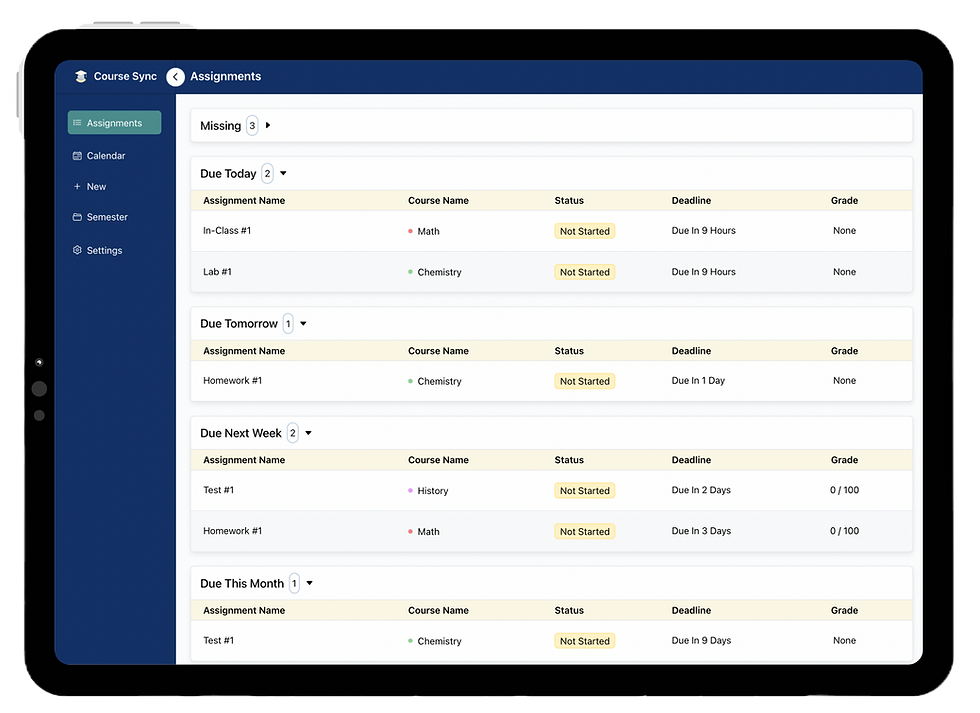
When an Online Planner Makes the Most Sense
An online planner is ideal if:
Your professors frequently adjust deadlines
You collaborate on group assignments
You switch between devices daily
You want automatic syncing from course platforms
You prefer searchable, editable planning systems
If your academic schedule changes often, paper systems struggle to keep up.
Potential Downsides to Consider
No system is perfect.
Common limitations include:
Requires internet for real-time syncing
Some advanced features may be behind paywalls
Notification overload if poorly configured
Learning curve for first-time users
That said, these are usually adjustable issues, not structural flaws.
Online Planner vs Traditional Systems
Where paper planners shine:
Tangible writing experience
Fewer digital distractions
Simplicity
Where online planners dominate:
Scalability
Syncing
Automation
Searchability
Collaboration
The difference becomes clearer as academic complexity increases.
Who Should Avoid an Online Planner?
If you:
Prefer fully offline planning
Dislike notifications
Have extremely simple scheduling needs
Then a physical planner might be enough. But for most modern students managing multiple systems, online planning dramatically reduces friction.
Final Verdict
An online planner isn’t just a convenience tool, it’s an infrastructure upgrade for academic life.
As coursework becomes more digital, deadlines more dynamic, and schedules more fragmented, cloud-based planning aligns with how education now operates.
If organization feels reactive instead of strategic, upgrading to an online planner may be the shift that changes your semester trajectory.


Comments